



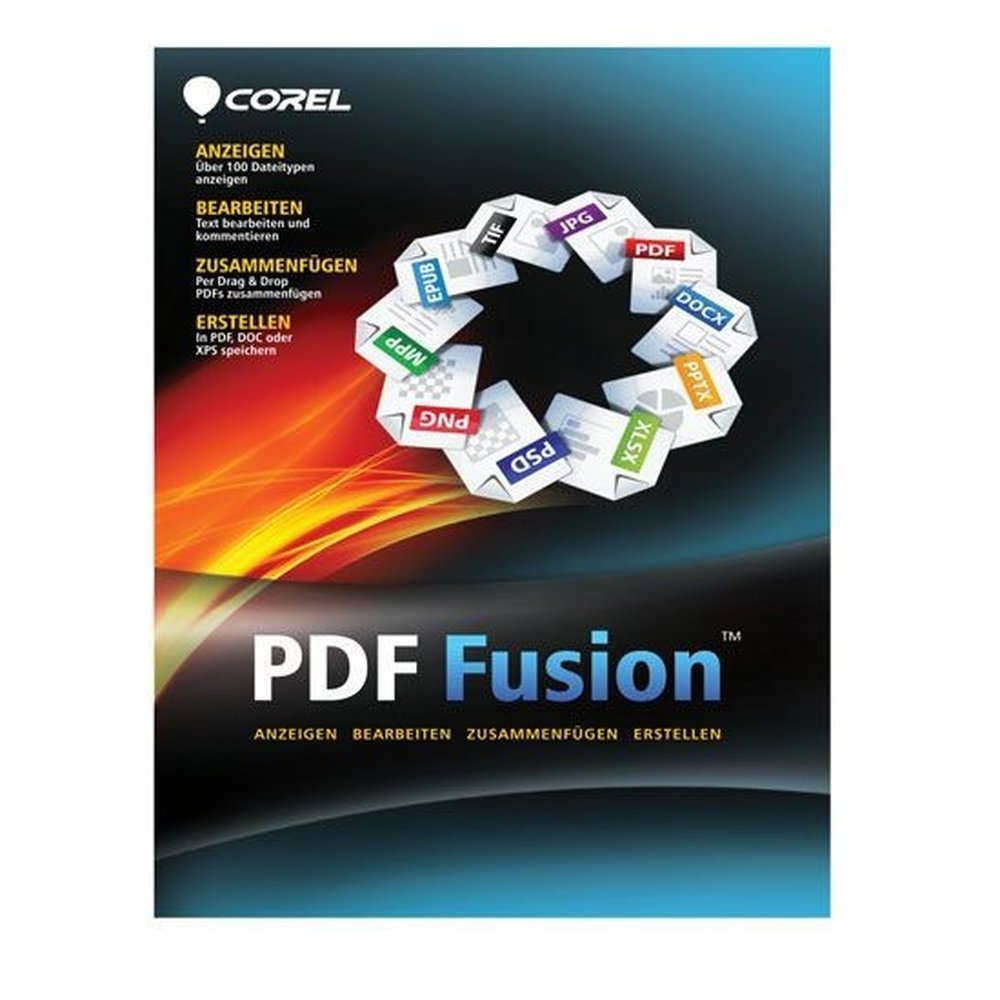
Corel PDF Fusion
€9.73 excl. VAT
- View more than 100 file formats without their original applications.
- Combine documents from different formats into one PDF using drag and drop.
- Edit PDF text and manage pages with cropping, rotation, links and bookmarks.
- Create and convert PDF, PDF/A, XPS and DOC files with batch processing.
- Lifetime licence for 1 PC with email delivery and activation instructions.
For activation in the European Union only. Orders with a billing address outside the EU are not accepted.
Description
Manage everyday documents with Corel PDF Fusion, an all-in-one PDF application for Windows that combines document viewing, assembly, editing and conversion. Whether you are organising study materials, preparing office paperwork or managing personal files, this software provides practical tools in one place. Open more than 100 file types, combine documents into PDFs, edit existing content and prepare files for sharing, printing or archiving. The lifetime licence covers one PC and requires a one-time purchase rather than a subscription.
Key features
- View: Open more than 100 file types, including DOC, XLS, PPT and images, without needing the original application. Choose Page, Assembly or Flick view, or use full-screen presentation mode.
- Assemble: Drag and drop documents in different formats into a single PDF. Add, remove and reorder pages in Assembly view before finalising the document.
- Edit: Change text directly in PDF files, rotate or crop pages and add watermarks, links and bookmarks.
- Review: Use highlighting, strikethrough, underlining and sticky notes to comment on documents. Redaction tools allow you to remove selected text.
- Create: Generate PDFs through the Corel PDF Creator print driver from any application that supports printing. A dedicated PDF tab is also available in Microsoft Word, Excel and PowerPoint.
- Convert: Save documents as PDF, PDF/A for archiving, XPS or DOC for Word. Batch Converter processes multiple files in one operation.
- Protect: Apply password protection and set restrictions on printing, copying and editing PDF documents.
- Optimise: Use the finishing wizard to prepare assembled files for printing or web distribution and add a password when required.
Benefits
- Convenience: View, assemble, edit and convert documents using one application instead of switching between separate tools.
- Compatibility: Open documents from different office applications without needing the software originally used to create them.
- Efficiency: Rearrange pages, combine different file formats and process multiple documents with batch conversion.
- Organisation: Add bookmarks, hyperlinks and watermarks to improve document navigation and presentation.
- Review: Highlight important passages, add notes and use redaction tools when preparing documents for distribution.
- Control: Protect PDFs with passwords and restrictions on printing, copying and editing.
- Ownership: Use a lifetime licence for one PC through a one-time purchase without a recurring subscription.
Who it is for
Corel PDF Fusion is suitable for home users, students and offices looking for an affordable way to combine and edit PDF documents. Students can organise course materials and annotate reference files. Home users can manage forms, correspondence and personal paperwork. Office professionals can assemble reports, prepare documents for printing, convert files and control access to shared PDFs. It is particularly useful when documents arrive in several formats and need to be managed through a single Windows application.
Licence options
The product configuration available at TresBizz includes:
- Devices: 1 PC.
- Term: Lifetime licence with a one-time purchase and no subscription.
The licence is intended for one computer. Check the system requirements before ordering to ensure compatibility with your device.
System requirements
According to Corel, version 1.14 requires:
- Operating system: Windows 10, 8.1, 8 or 7, 32-bit or 64-bit, with the latest updates.
- Processor: 1.3 GHz.
- Memory: 512 MB RAM, with 1 GB recommended.
- Storage: 250 MB available disk space.
- Display: 1024 x 768 screen resolution.
Corel PDF Fusion is designed for Windows. macOS is not supported, and Windows 11 is not listed as a supported operating system for this version.
Delivery and activation
Purchase your genuine new Corel PDF Fusion licence from TresBizz, based in Brussels, Belgium. Your product key, download link and activation instructions will be sent by email within 24 hours. Follow the supplied steps to download and install the software on your compatible Windows PC, then activate it using your licence key.
Every order includes an official VAT invoice. If a product key does not work, TresBizz provides support by email and offers a replacement or refund where applicable. Keep your order details and delivery email available during activation.
Conclusion
Corel PDF Fusion brings document viewing, assembly, editing, reviewing, creation and conversion together in one Windows application. Support for more than 100 file types, page management, batch conversion and password protection makes it a practical option for everyday PDF tasks. Whether you are studying, organising personal documents or preparing office files, you can manage different document formats with one tool. Choose the lifetime licence for one PC from TresBizz and receive your product key, download link and activation instructions by email within 24 hours.
Frequently Asked Questions about Corel PDF Fusion
What is Corel PDF Fusion?
Corel PDF Fusion is an all-in-one PDF application for Windows by Corel. It allows you to view more than 100 file types, assemble documents into PDFs, edit PDF content, add review comments, create documents and convert files into different formats.
Which file formats can Corel PDF Fusion open and create?
It can open more than 100 file types, including DOC, XLS, PPT and images, without requiring the original application. You can save documents as PDF, PDF/A, XPS or DOC. The Batch Converter also processes multiple files in one operation.
Does Corel PDF Fusion support Windows 11 or Mac?
No Windows 11 or macOS support is specified for Corel PDF Fusion version 1.14. The listed supported systems are Windows 10, 8.1, 8 and 7 in 32-bit and 64-bit editions, with the latest updates.
Is the Corel PDF Fusion licence a subscription?
No. This listing includes a lifetime licence for one PC. It is a one-time purchase and does not require a recurring subscription.
How will I receive and activate Corel PDF Fusion?
TresBizz sends the genuine new product key, download link and activation instructions by email within 24 hours. Every order includes an official VAT invoice. If a key does not work, email support is available with a replacement or refund offered where applicable.
Additional information
| Devices | 1 PC |
|---|---|
| Term | Lifetime |
Related products
-

Tungsten Power PDF Advanced 2025
€102.71 excl. VAT Add to cart -
ABBYY FineReader PDF 16 Standard
Price range: €64.55 through €171.25 excl. VAT Select options This product has multiple variants. The options may be chosen on the product page -
MobiPDF Lifetime
€74.37 excl. VAT Add to cart -

Ashampoo PDF Pro 5
€20.00 excl. VAT Add to cart





Reviews
There are no reviews yet.